⬜
White background
Pure white, centered main images that meet marketplace rules for Amazon, Flipkart, eBay and most stores.
Products / ChatGPT Product Image Generator
Chrome extension · works with ChatGPT
Upload a photo, pick a few options, and get clean, consistent images for Amazon, Flipkart, eBay or your own shop – generated in batches and saved straight to your computer.
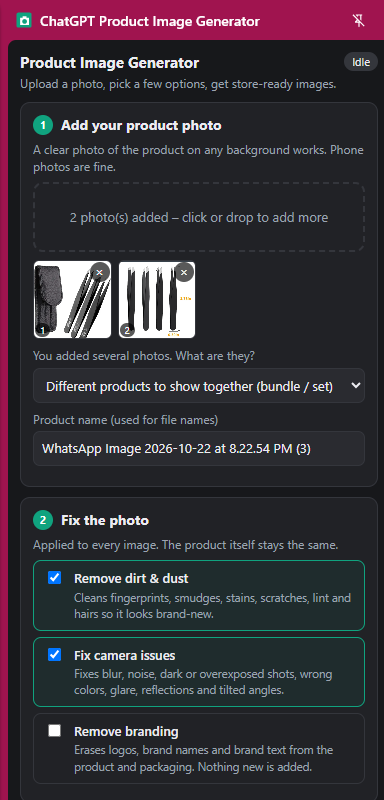
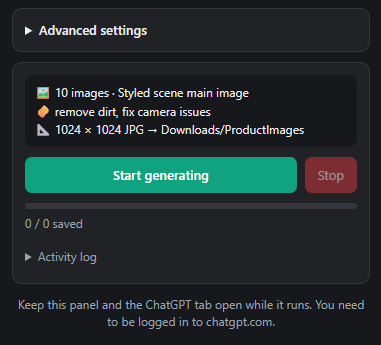
The side panel walks you through everything. Keep it and your ChatGPT tab open while it runs.
Any clear photo on any background – phone shots are fine. Add several photos to build a bundle or set.
Remove dust, fingerprints and lint, fix blur, lighting, glare and tilted angles, or erase branding. The product itself stays the same.
Pure white marketplace background, a realistic styled scene, or an ad-style showcase – plus optional lifestyle, size and benefit shots.
Choose a store preset or custom size, JPG or PNG, how many sets – then hit Start generating.
Pure white, centered main images that meet marketplace rules for Amazon, Flipkart, eBay and most stores.
Real-looking backgrounds – marble, wood, outdoors – while keeping your product unchanged.
Ad-style hero shots with creative props and effects for banners, social posts and ads.
Removes dirt, smudges, scratches and hairs, and fixes noise, exposure, colour and reflections.
Add lifestyle, size / dimensions, how-to-use and benefits images to every set automatically.
Generate many sets in one go. Files are named after your product and saved to a folder you choose.
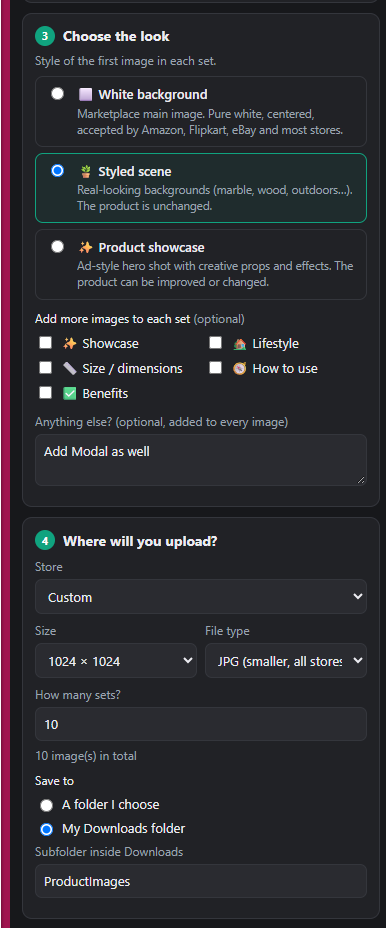
Every option is written in plain language. Pick what you want, add a note like “show the case as well”, and the extension handles the prompting, waiting and downloading for you.
A Chromium-based browser (Chrome, Edge, Brave) and a ChatGPT account. You need to be logged in to chatgpt.com in the same browser.
The White background and Styled scene options keep the product unchanged and only fix the photo and background. Only the Product showcase style is allowed to creatively enhance the product.
In a folder you choose, or in a subfolder of your Downloads folder (for example Downloads/ProductImages).
Yes. Press Stop at any time – images already generated stay saved.
No. This is an independent tool that works with your ChatGPT account. It is not affiliated with or endorsed by OpenAI.
Install the extension, open the side panel and generate your first set in minutes.
Add to Chrome